

Investors care more about tidy, consistent documents than the tool holding them. Here is how to build a free, VC-ready data room, and the point at which the scrappy stack starts costing you more than it saves.
Fundverse now has Data rooms, a data room for each raise, built for companies sharing documents with funders. Each funder gets access with an NDA, a verified email and, if you want one, an expiry date. You see who opened what, and you can withdraw access whenever you like.
But before we get to that, let's talk about the scrappy version. Plenty of founders have raised on a free data room built from bootstrapped tools, and there is no shame in it. This post shows you how to MacGyver a VC-ready setup for nothing, and then tells you honestly when that stops being clever and starts being risky.
The Core Philosophy: Organisation Beats Software
Here is the secret nobody selling you software will say out loud: investors do not care what tool holds your documents. They care that they can find things, that the numbers agree with each other, and that you look like someone who runs a tight ship. A clean Google Drive beats a messy Carta every time.
VC due diligence is mostly pattern-spotting. A missing contract, a cap table that does not match the term sheet, a folder called "final_FINAL_v3": these tell an investor how you will run their money. Tidiness is a signal, and it costs nothing. If you want a view of what investors expect to see, read our guide on what investors actually want in a data room.
The Data Room Hack: Drive or Notion, Done Properly
Start with one top-level folder named for the raise, then number the subfolders so they sort in the order an investor reads them. The numbering is the trick. It turns a pile of files into a guided tour.
- 01 Overview: one-page summary, pitch deck, product demo link
- 02 Financials: historic accounts, current model, runway and use of funds
- 03 Cap table and legal: cap table, incorporation documents, shareholder agreements
- 04 Team: founder bios, key contracts, an org chart
- 05 Product and IP: roadmap, IP assignments, key licences
- 06 Customers and traction: metrics, anonymised references, pipeline
Permissions without the pain
Never share the whole folder with "anyone with the link". Share per investor, to a named email address, with view-only access and downloading switched off where the tool allows it. Keep a private master copy that only you can edit, and share a copy or a subset. If you prefer Notion, a single page with sub-pages and per-person sharing works the same way, though it gives you less control over files.
Name things like an adult
Use a consistent pattern such as Company_Document_YYYY-MM. Add a short index document at the top listing what is where. It takes twenty minutes and saves an investor's analyst an afternoon. For a fuller explanation of the concept, see what a startup data room is.
The Cap Table Workaround in Google Sheets
A cap table template in Google Sheets can look and behave just like the polished export from paid software, as long as it is formula-driven rather than typed in by hand. The rule: inputs in one place, everything else calculated.
- Tab 1, Rounds: one row per issuance with date, holder, share class, shares issued and price per share
- Tab 2, Cap table: use SUMIFS to total each holder's shares, then divide by total shares for percentage ownership
- Tab 3, Options pool: granted, vested, unvested and unallocated, with vesting calculated from grant date
- Tab 4, New round: pre-money, investment and pool top-up as inputs, with new price per share and post-round ownership as outputs
- Tab 5, Checks: a cell that flags if percentages do not add to 100
Add a fully diluted view as well as an issued view, because investors will ask for both. Lock formula cells, and put a version date at the top. Our post on building a cap table that attracts investors covers what good looks like, and the startup valuation calculator can help you sense-check the price going into the new-round tab.
Tracking Engagement Without a DocSend Subscription
Pitch deck hacks are mostly about knowing whether anyone read the thing. The free route has two options. First, use a link shortener with click analytics and send each investor their own unique link, so you can see when a specific link was clicked. Second, if you host the deck as a PDF in Drive, the sharing settings and activity view can show you who accessed it, depending on your account type.
Both are blunt. A click tells you someone opened a link, not that they read slide nine, and link previews or email scanners can create phantom clicks. Treat the data as a nudge to follow up, not as proof of interest.
This is where the scrappy stack starts to creak, and where Fundverse Data rooms earns its place. You see which funder opened which document, rather than guessing from a click on a shortened link.
Watermarking and Security on a Budget
You do not need a security team to be sensible. Start with what you share. Redact anything an investor does not need at this stage, such as customer names, salaries and bank details, and hold back the crown jewels until late in the process.
- Add a simple text watermark in your slides or PDF export, such as "Confidential, prepared for [Investor name]"
- Export to PDF so nobody gets your editable source files
- Switch off download, print and copy for viewers where your tool allows
- Ask for an NDA before sharing anything sensitive, and keep a signed copy
- Use named email access only, never open links
- Review who has access every week, and remove people who have gone quiet
A watermark will not stop a determined leaker, but it discourages casual forwarding and tells you whose copy it was if something escapes. That is usually enough in practice.
The "When to Upgrade" Threshold
The free stack is right for early conversations. It becomes false economy at a predictable point. Rough rule: when you are running a live process with around ten or more investors, or when you are heading into a priced round such as a Series A, the time you spend managing permissions and chasing clicks costs more than proper software. A leaked document or an investor reading a stale file costs a great deal more.
| Situation | Free stack | Dedicated data room |
|---|---|---|
| Early chats with a few angels | Fine | Optional |
| Around ten or more investors in play | Strained | Worth it |
| Series A or priced round | Risky | Expected |
| Sensitive IP or customer data | Weak controls | Better fit |
| Need to withdraw access fast | Manual, per file | Built in |
Once you cross that line, the case for Fundverse is simple. You get a data room for each raise, shared per funder with an NDA, verified email and an expiry date if you want one. You can share a package of documents instead of the whole room, so a first-call investor sees the essentials while a late-stage one sees more. Checklists of what to include keep you from forgetting the boring but critical items, and you can withdraw access at any time.
What the Data Room Screen Shows
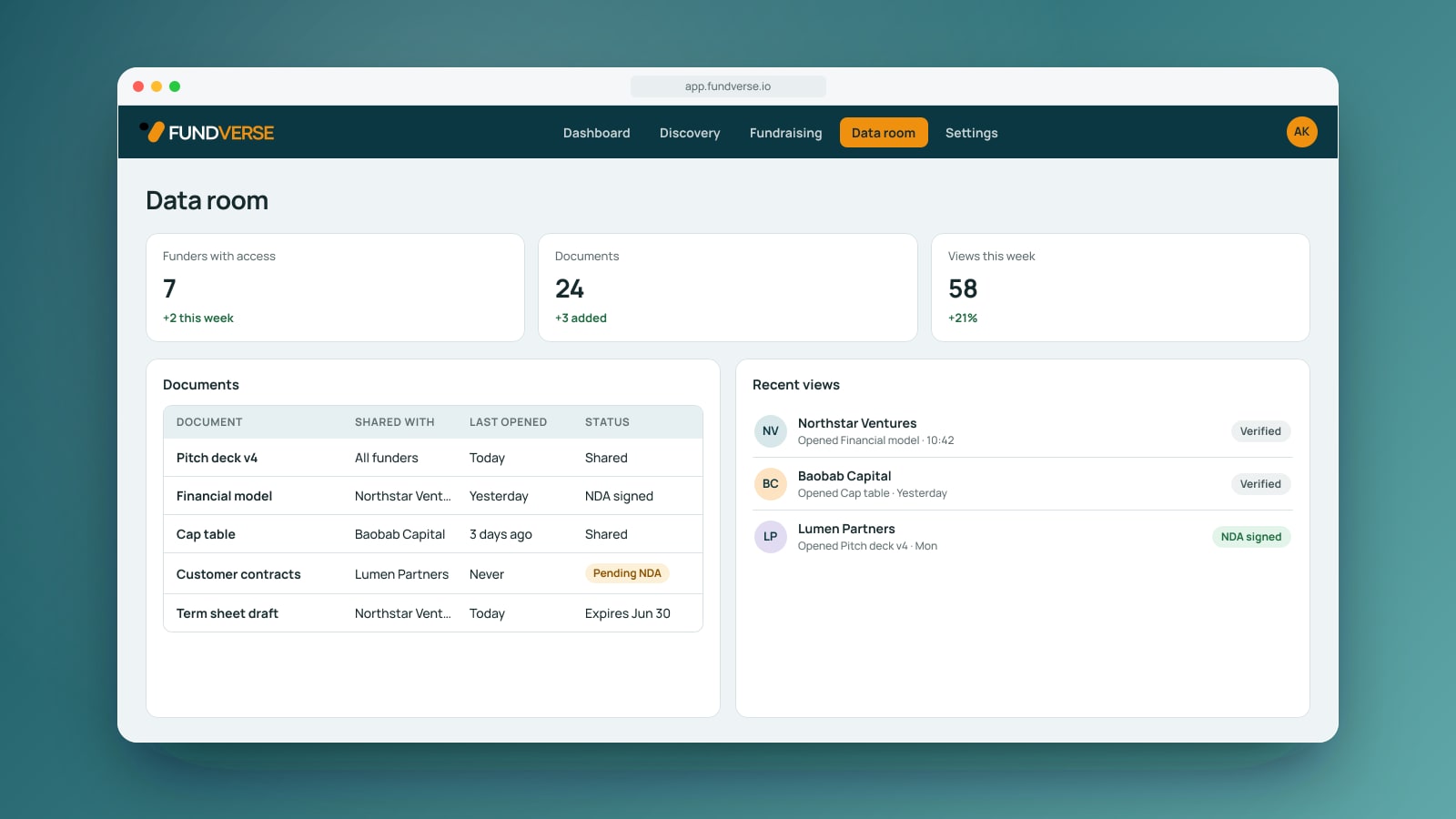
The screen is titled Data room and opens with three stat tiles: funders with access, documents, and views this week. Below sit a documents table showing each document, who it is shared with, when it was last opened and its status, and a list of recent views by funder. It is a quick read of where your raise stands on any given morning.
How to Set Up Your Data Room
- Open Data room in your company dashboard and set up the room for your raise
- Work through the checklists of what to include and add your documents
- Choose which funders get access and the package of documents each should see
- Set the NDA and verified email requirement for each funder, plus an expiry date if you want one
- Share, then watch which funder opened which document
- Withdraw access at any time if a conversation ends
Done MacGyvering? Set up your virtual data room on Fundverse, share it per funder with an NDA and see who opens what.
Where to Find It
Data rooms lives under Data room in the company dashboard. You can read more on the Data rooms page, or see the wider picture on how Fundverse works and what we offer for founders.
Try It on Your Next Raise
Start scrappy if you must: a tidy Drive, a formula-driven cap table and a clear head will carry you a long way. When your raise gets real, give Data rooms a go and let it handle the permissions, the NDAs and the view tracking, so you can get back to the actual business of raising.
Frequently asked questions
Topics
free data room
fundraising hack
cap table template
VC due diligence
bootstrapped tools
fundraising tech stack
pitch deck hacks
Raising or investing?
Find the right people on the other side of the table, and run the round in one place.